
A lifting log on your Apple Watch
Brolift for Apple Watch follows the workout on your iPhone. Your current set, the rest countdown, your heart rate and your calories are on your wrist, so the phone can stay in your pocket between sets.
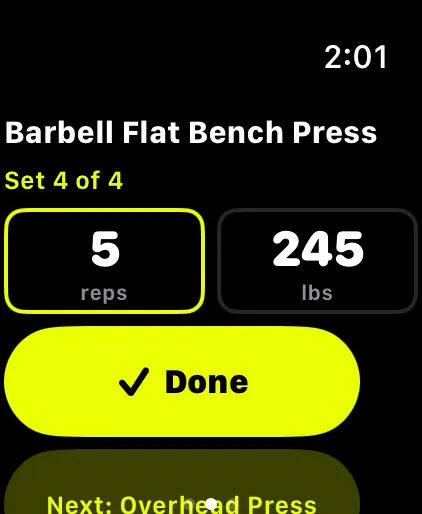
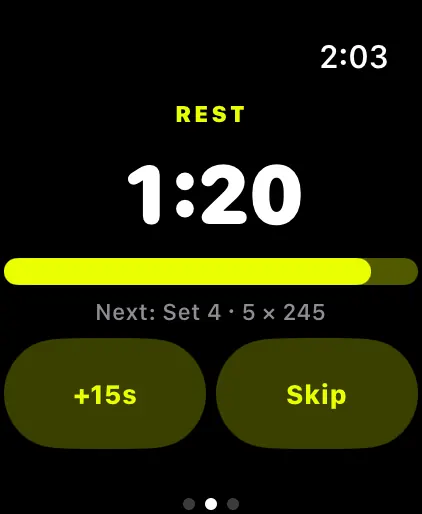
Screenshots show the app with sample data.
What the watch shows
- Your current set, with a Done button. Turn the Digital Crown to change the reps or the weight.
- The rest countdown, with +15s and Skip.
- Today’s plan, so you can see what is next.
- Your heart rate and calories while you lift.
Sets you log on the watch go into the workout on your iPhone.
How it works with your iPhone
Start a workout on your iPhone and the watch follows it. With Open on Apple Watch turned on in Settings › Preferences › Workout & Rest Timer, Brolift opens on your watch by itself when you start a workout on your iPhone.
You can also start a session on the watch alone to record heart rate and calories. In that case you log the sets on your iPhone.
Rest on time
The rest timer starts when you add or copy a set, and the countdown shows on the watch as well as on the Lock Screen and in the Dynamic Island. Rest length is 1 minute, 1:30, 2, 3 or 4 minutes, set in Settings › Preferences › Workout & Rest Timer.
Apple Health and your Activity rings
When you end a workout on the watch, it saves a strength workout to Apple Health, so the session counts toward your Activity rings. To stop that, turn off Save watch workouts to Health in Settings › Preferences › Workout & Rest Timer. Brolift on iPhone never writes to Apple Health.
Afterwards, the workout on your iPhone can chart your heart rate across the whole session, with a marker for every exercise. Brolift reads those readings from Apple Health each time you open the workout and never copies them to iCloud.
What you need
- An Apple Watch with watchOS 10 or later.
- An iPhone with iOS 26 or later, with Brolift installed.
Brolift is free, with no in-app purchases, subscriptions or ads, and the watch app is included.
Apple Watch questions
Does Brolift work with Apple Watch?
Yes. Brolift for Apple Watch needs watchOS 10 or later. Start a workout on your iPhone and the watch follows it: your current set with a Done button (turn the Digital Crown to change the reps or weight), the rest countdown with +15s and Skip, today's plan, and your heart rate and calories. Sets you log on the watch go into the workout on your iPhone.
You can also start a session on the watch alone to record heart rate and calories; log the sets on your iPhone. When you end it, the watch saves a strength workout to Apple Health, so it counts toward your Activity rings, unless you turn off Save watch workouts to Health in Settings › Preferences › Workout & Rest Timer. The same page has Open on Apple Watch, which opens Brolift on your watch when you start a workout on your iPhone.
How does the rest timer work?
The rest timer starts when you tap Add Set or Copy, with −15s, +15s and Skip. When rest is over, Brolift sends an alert if your iPhone is locked or you are in another app, and the countdown shows on the Lock Screen and in the Dynamic Island. On Apple Watch it shows on the watch too.
Settings › Preferences › Workout & Rest Timer has the options: Rest timer, Rest length (1 min, 1:30, 2 min, 3 min or 4 min; 1:30 to start), Start after each set (when it is off, start rest from the timer button), Alert when rest is over and Lock Screen countdown. Keep screen awake and Show last time are on the same page.
Does Brolift write to Apple Health?
Brolift on iPhone doesn't: workouts you log on your iPhone are not added to the Health app. Brolift on Apple Watch saves a strength workout to Apple Health when you finish a watch workout, so it counts toward your Activity rings. To stop that, turn off Save watch workouts to Health in Settings › Preferences › Workout & Rest Timer.
Why is there no heart rate on my workout?
Heart rate needs a device that records it, such as an Apple Watch worn during the workout. Also check that HealthKit Features is on in Settings › Preferences › Apple Health, that Brolift is allowed to read heart rate in Apple Health, and that the time range in the workout's Apple Health section covers the time you lifted. Because Brolift reads heart rate from Apple Health each time, it also needs the readings to still be in Apple Health on that iPhone.
Get Brolift for iPhone and Apple Watch
Brolift is a free workout log for iPhone and Apple Watch, with no account, no subscription and no ads. It needs iOS 26 or later.